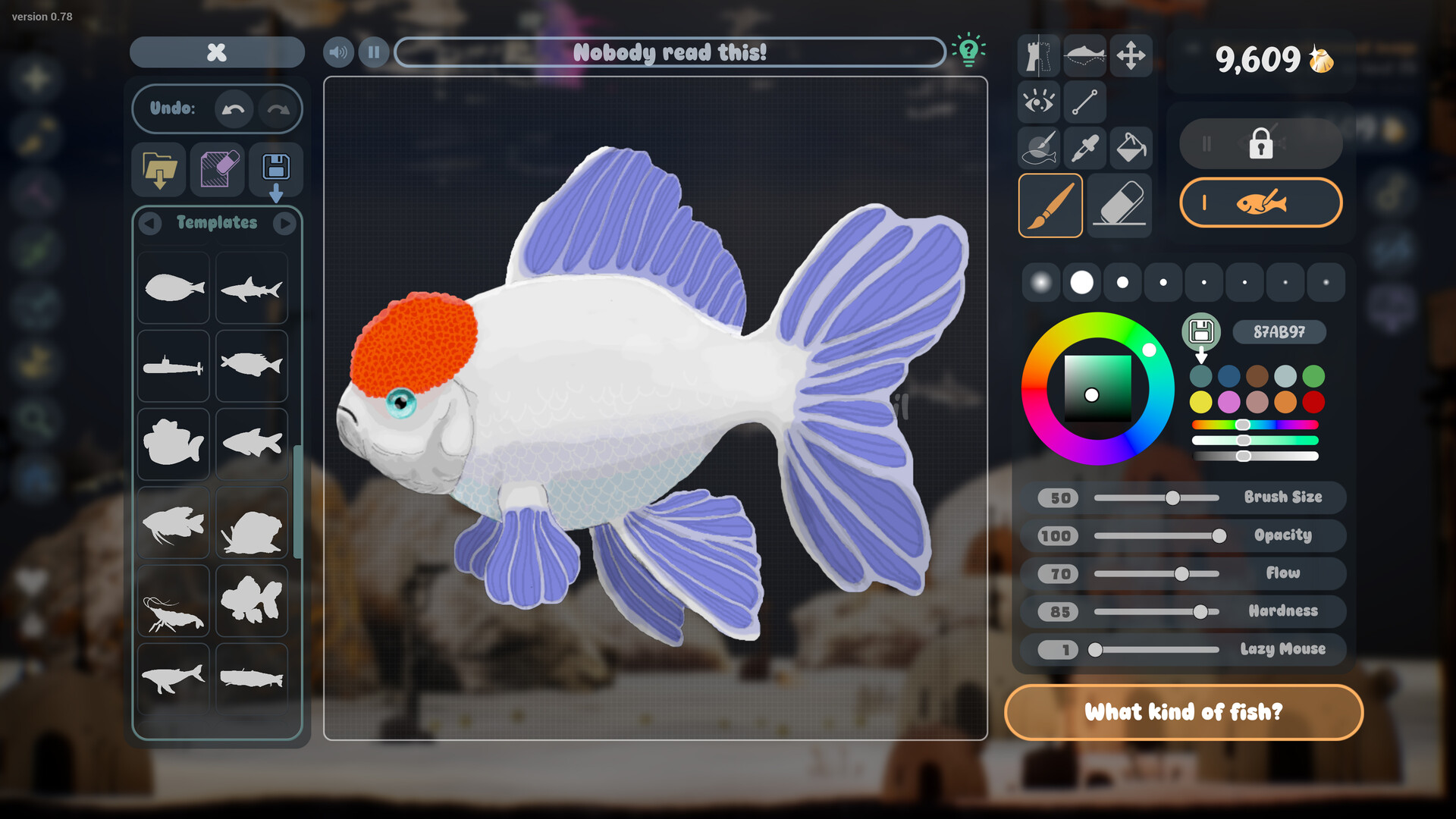
Choose a Shape and Make It Your Own
Choose an available template in Drawquarium's drawing editor, customize it with your own colors and details, then complete the drawing to bring the fish into your aquarium. Golden Scales unlock additional templates, brushes and customization options as you progress.
Templates, Ready-made Fish, and PNG Imports
| Option | Details |
|---|---|
| Fish template | A starting shape or drawing aid that you customize in the editor. Choose this route when you want help with the shape while still drawing your own fish. |
| Ready-made fish | An existing fish design you can select without creating an original drawing. Choose this route when you want to enjoy the aquarium without spending time drawing. |
| PNG import | Artwork made outside Drawquarium that you bring into the aquarium. PNG import belongs to the full-game route; its availability differs in the reduced demo. |
Pick a template when the blank canvas is the part holding you back. Pick a ready-made fish when you would rather spend your time arranging and watching the tank. If you already have artwork you love, PNG import gives that drawing a route into the full game.
Turn an Available Template Into a Fish
- Choose an available template shape in the drawing editor to give your fish a starting form.
- Customize the shape with colors and drawing tools to turn the starting design into your own creation.
- Complete the drawing to bring the finished creature into your aquarium.
For an early attempt, choose a shape you can imagine coloring without getting stuck on tiny details. Give it a clear overall design before worrying about elaborate shading. Seeing a finished fish in the tank is a useful point to pause and decide what you want to try next.
Take care with the fish's name before it comes to life. A living fish cannot be renamed directly; the developer's workaround is to clone it or import its texture again and name the new fish. Do not rename its files by hand.
Unlock More Templates With Golden Scales
Golden Scales are the currency for unlocking additional templates, brushes and customization options. The newer opening experience removed templates from the beginning, so an older walkthrough can show a different starting selection. If no template is available yet, start from a blank canvas and return to templates as you progress.
Choose your next unlock around something you actually want to draw. If you already have a fish idea, prioritize a template that helps you get its overall shape onto the canvas. If you enjoy freehand drawing, a brush may be more useful to you than another starting shape.
Use the Editor's Drawing Aids
Scroll near the part of the drawing you want to zoom into. The number keys select colors from your stored palette, which can make switching between familiar colors easier. There are no layers; the developer recommends trying the masked brush instead.
The expanded editor includes improved Fill Bucket tools, stamps for textures, shapes, eyes and fins, custom templates and saved color palettes. If drawing becomes slow, use the pause button beside the fish's name while you work. Turning off VSync has also helped some players with drawing slowdown.
Keep Demo and Full-game Options Separate
For the reduced demo, work with its drawing tools, available templates and ready-made fish instead of relying on Import. The event demo temporarily unlocked additional features before returning to a more limited feature set. In the full game, PNG import lets you bring in artwork made in another drawing application.
Once you have a design you like, custom templates and categories let you save starting points for future drawings. If you want another copy of a finished fish, click that fish and use Clone; the clone starts as a baby. For a different look, the expanded game also lets you edit a finished fish again later.